YouTube Timestamp Link
Generate YouTube links that start at a specific timestamp. Enter hours, minutes, seconds or a timestamp like 1:23:45.
- 100% free
- No sign-up
- Clear controls
- Open and use
- Generate links that start at any timestamp
- Enter time as H:M:S or individual fields
- Validates YouTube URL format
- Works with youtube.com and youtu.be links
- One-click copy to clipboard
What is YouTube Timestamp Link Generator?
YouTube Timestamp Link Generator creates shareable YouTube URLs that start playing at a specific moment in the video.
Instead of telling someone to skip to 1:23, you give them a link that jumps there automatically. It works with both youtube.com/watch and youtu.be short URLs, and lets you enter the time as individual hours/minutes/seconds fields or as a timestamp string like 1:23:45.
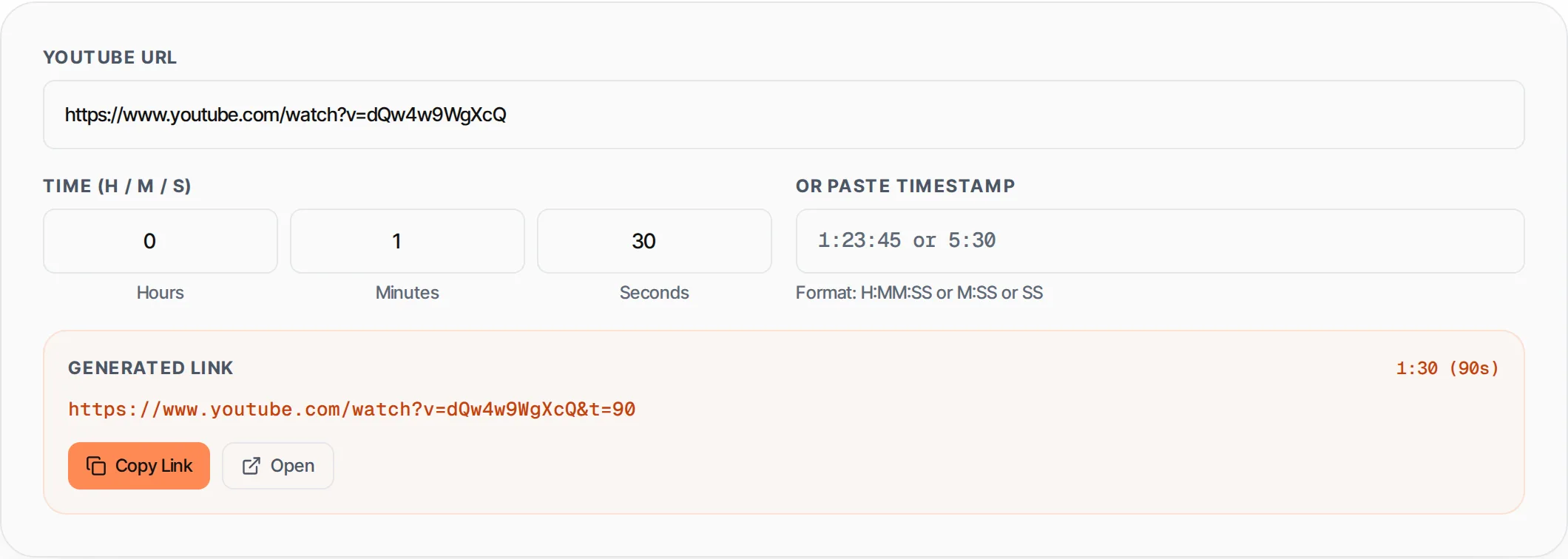
How to use YouTube Timestamp Link Generator
- 1
Paste the YouTube URL
Enter the YouTube video URL. Both full youtube.com/watch and short youtu.be links work.
- 2
Set the timestamp
Enter hours, minutes, and seconds in the number fields, or paste a timestamp like 1:23:45 or 5:30.
- 3
Copy the link
The timestamped URL is generated instantly. Click Copy Link to copy it to your clipboard.
- 4
Share or open
Share the link anywhere. Click Open to test it in a new tab.
Everything this tool
does for you
- Generate timestamp links for any YouTube video
- Enter time as separate H/M/S fields or a timestamp string
- Supports youtube.com/watch, youtu.be, and /shorts/ URLs
- Real-time URL preview as you adjust the time
- Shows total seconds and formatted timestamp
- One-click copy to clipboard
- Open link in new tab to verify
- URL validation with error feedback
Related free tools
Frequently asked questions
Beyond this tool
See the full picture for your website.
Enter your URL for a free audit across eight scored areas. See prioritised issues and clear next steps in one report.
Free to start · No signup required