SlapMyWeb
Skip to tool
Free tool

Meta tag generator

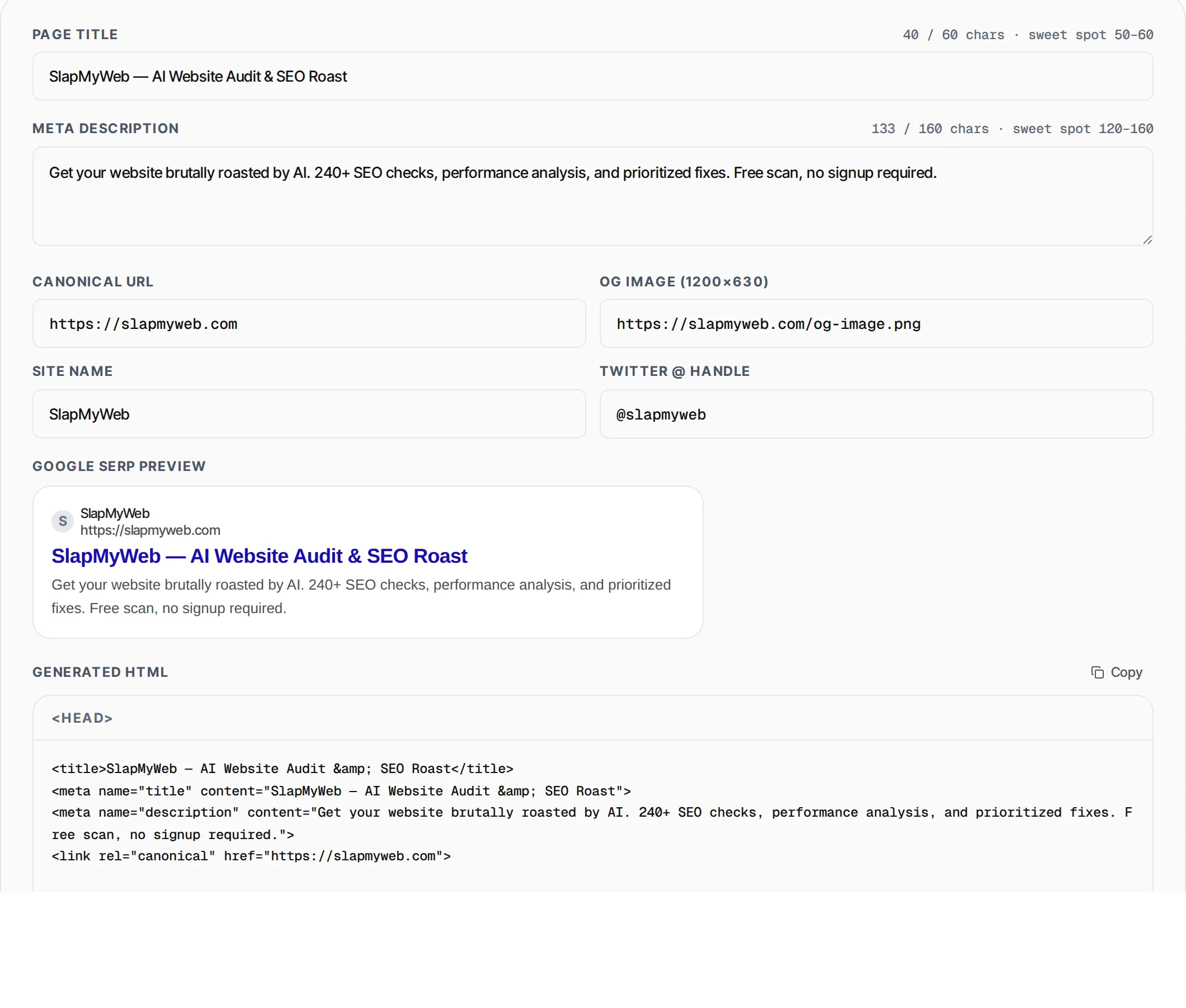
Generate perfect SEO meta tags including Open Graph and Twitter cards. Live character-count meters help you stay within Google's optimal lengths.

38 / 60 chars · sweet spot 50–60
96 / 160 chars · sweet spot 120–160

My Awesome Website — Best Tools Online

Discover the best free online tools for developers, designers and marketers. No signup required.

<head>
<title>My Awesome Website — Best Tools Online</title>
<meta name="title" content="My Awesome Website — Best Tools Online">
<meta name="description" content="Discover the best free online tools for developers, designers and marketers. No signup required.">

<!-- Open Graph / Facebook -->
<meta property="og:type" content="website">
<meta property="og:title" content="My Awesome Website — Best Tools Online">
<meta property="og:description" content="Discover the best free online tools for developers, designers and marketers. No signup required.">

<!-- Twitter -->
<meta name="twitter:card" content="summary_large_image">
<meta name="twitter:title" content="My Awesome Website — Best Tools Online">
<meta name="twitter:description" content="Discover the best free online tools for developers, designers and marketers. No signup required.">

What is Meta Tag Generator?

A meta tag generator is an essential SEO tool that creates the HTML meta tags search engines and social media platforms use to understand and display your web pages. Meta tags include the title tag (shown as the clickable headline in Google search results), the meta description (the snippet text below the title), Open Graph tags (used by Facebook, LinkedIn, and WhatsApp when your link is shared), and Twitter Card tags (used by Twitter/X for rich link previews). Without properly optimized meta tags, your pages may show truncated titles in search results, display generic descriptions that hurt click-through rates, or render poorly when shared on social media. This free meta tag generator tool helps you craft pixel-perfect tags with real-time character counters, so you always stay within Google's recommended 50-60 character title limit and 120-160 character description sweet spot. The generated HTML is copy-paste ready for your website's <head> section.

How to Use Meta Tag Generator

  1. 1

    Fill in your page details

    Enter your page title, meta description, canonical URL, OG image URL, site name, and Twitter handle. The character counters update in real time so you can stay within optimal limits.

  2. 2

    Preview the generated HTML

    Watch the live preview update as you type. The tool generates title tags, meta description, canonical link, Open Graph tags for Facebook/LinkedIn, and Twitter Card tags all at once.

  3. 3

    Copy and paste into your site

    Click the Copy button to copy the complete HTML meta tag block to your clipboard. Paste it inside your page's <head> section, or use it in your CMS meta tag fields.

Features

  • Real-time character counters with color warnings for title (60 chars) and description (160 chars)
  • Complete Open Graph tag generation for Facebook, LinkedIn, and WhatsApp sharing
  • Twitter Card meta tags with large image support and @handle attribution
  • Canonical URL tag to prevent duplicate content issues in search engines
  • HTML entity escaping to prevent XSS and ensure valid markup output
  • Zero server calls -- everything runs in your browser, your data stays private

Related Tools

Frequently Asked Questions

What is the ideal title tag length for SEO?+
Google typically displays the first 50-60 characters of a title tag. Titles longer than 60 characters may be truncated with an ellipsis in search results. Aim for 50-60 characters to ensure your full title is visible and compelling.
What is the recommended meta description length?+
Google shows roughly 120-160 characters of a meta description on desktop and about 120 characters on mobile. Write your most important information in the first 120 characters, then add supporting detail up to 160 characters.
What are Open Graph tags and why do I need them?+
Open Graph (OG) tags control how your page appears when shared on Facebook, LinkedIn, WhatsApp, and other platforms. Without OG tags, these platforms guess what image and text to show, often producing ugly or misleading link previews that reduce clicks.
Do I need both Open Graph and Twitter Card tags?+
Yes. While Twitter can fall back to OG tags, having dedicated Twitter Card tags gives you finer control over your Twitter/X previews. The summary_large_image card type displays a prominent image that drives significantly higher engagement than the default small card.
What is a canonical URL and should I include it?+
A canonical URL tells search engines which version of a page is the "official" one. If your content is accessible at multiple URLs (www vs non-www, HTTP vs HTTPS, query parameter variations), a canonical tag prevents duplicate content penalties and consolidates ranking signals.
Is my data safe using this meta tag generator?+
Absolutely. This tool runs entirely in your browser using client-side JavaScript. No data is sent to any server. Your page titles, descriptions, and URLs never leave your device, making it safe to use with confidential or pre-launch content.